Help Page - NEXP1GO Router

Everything we can provide, to date, specific to the NEXP1GO router should be found on this page.
Community
Visit our community over at https://wirelessjoint.com for troubleshooting, carrier connectivity tips, and tons of information for the beginner all the way to the advanced user.
Our Facebook group is very active and constantly growing, visit us at the LTE 5G Hacks Facebook group.
Firmware
The latest NEXP1GO router firmware can always be found in our file repository here:
Latest:
Note: This is not an exhaustive list of updates since last firmware release, only the latest updates in the core firmware.
- UI updates and tweaks
- Minor software package cleanup
- Updated output for Web Console
- Updated logos
- Added more functions to Modem Misc. page
- Added Modem Profile backup and restore functionality
- BW Monitoring software tweaks
- Zerotier addition and tweaks
- Modem interface tweaks
- Hotspot code tweaks
Older (In no particular order):
WiFiX-NEXP1GO-GO2023-08-04a.zip
WiFiX-NEXP1GO-GO2023-06-01a.zip
Our NEXP1GO router firmware is always provided to our customers, if you see this message then either you haven’t purchased one of the NEXP1GO routers or you are not logged in to your account.
If you feel this is in error, please shoot us an email and let us know and we will get the issue corrected.
Tutorials
We produce tutorials and resources as often as we can. Check back often. If there is anything for your WiFiX NEX router you need help with and you cannot find the information here, please reach out via our contact form and let us know how we can help you.
Notice: Our tutorial content is for Wireless Haven customers. If you are not able to watch the videos and you believe that you should be able to, please contact us so we can ensure that you have membership to this content based on your purchases. You must be logged into your account to see this tutorial content.
Updating the WiFiX Firmware
Follow with us as we show you how to update your WiFiX router to the latest firmware release.
This process is the same for all WiFiX routers.
Live Streaming TV on WiFiX Firmware - VPN
Sometimes streaming Live TV on a wireless internet system can get blocked by the streaming service provider.
This is the start to finish way to install streaming specific VPN service from Torguard on any WiFiX router.
WiFiX Firmware - Disable the WiFi Radios
If you don’t need the WiFi function of your WiFiX router, here is the step by step method to disable the WiFi radios of your router.
Quectel Modem Modules - Updating modem firmware while the module is in the router
If your router has a free USB port (sometimes a USB hub is needed, if you are using the port for your modem) then you can keep your modem in your router and update the modem firmware with a simple USB thumb drive or portable hard drive.
A Quick Video on inserting the SIM card into your NEXP1GO
A demo on how to safely insert the SIM card.
Using the PoE power via WAN port as a LAN port.
Do you need to use the PoE function of the NEXP1GO router?
This video steps you through the entire process from beginning to end.
NEXP1GO General Intro
General hardware overview of the NEXP1GO router.
Modem MHF4 Connector Installation
Installing the small MHF4 antenna connectors is not easy. Here is a visual guide on how we do just that.
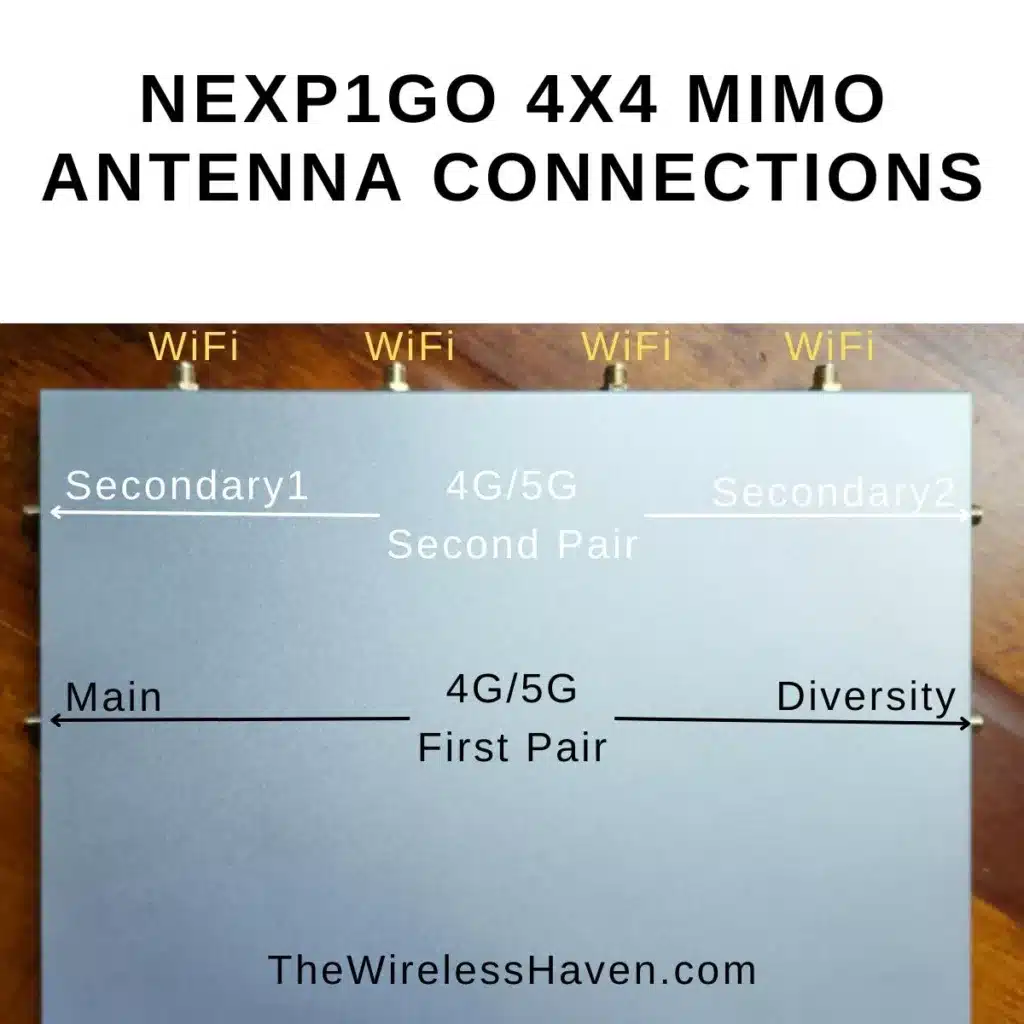
Antenna Connections for the NEXP1GO